
• Skip to primary navigation
  • Skip to main content
321 Web Marketing
Services
Who We Serve
Our Software
SEO
Local SEOMulti-Location SEONational SEOTechnical SEO AuditsLink Building
AI Search Optimization
ChatGPTGoogle AI OverviewsGeminiPerplexityCopilotClaude
Google Ads Management
Search AdsLocal Service AdsGoogle Maps AdsDisplay & RemarketingLanding Page Optimization
Content Marketing
Content StrategyBlog ContentWebsite CopywritingLocation Pages
WordPress Services
Web DesignWebsite RedesignsCustom DevelopmentHosting & Maintenance
Analytics & Dashboards
Call & Form TrackingMarketing DashboardsAI Prompt Monitoring
Show up everywhere buyers look, including AI.Search, maps, AI and reviews, all in one audit.
View all servicesGet my free audit
Home Services
Commercial CleaningContractorsElectricalFlooringHVACMovingPest ControlPlumbingRoofingSolarStorage
Professional Services
Finance & CPA FirmsHealthcareInsurance AgenciesLaw FirmsMSPs & CybersecurityStaffing
85 → 153Qualified leads a month for an insurance agency, from year one to year three with 321.Read case studies →
Targeting multiple cities?Win every market with our local marketing playbook.
All industriesSchedule strategy session
Lead TrackerEvery call and form traced to its source and qualified.Content PortalReview, approve and track every piece of content in one place.SEO/SEM DashboardRankings, ad spend and leads in one live view.AI Website QA ToolAutomated checks that catch site issues before visitors do.ROAS CalculatorFreeSee what your ad spend should be returning.
Supercharge your campaignsIntelligence and automation, built in.
All software →
About 321
Our StoryTeamOur ProcessCareersCommunityAgency News
Our Work
Case StudiesAwardsPortfolio
Want to see if we're a fit?Book a free strategy workshop→
BlogGuidesGoogle Algorithm Updates
Lead Generation Benchmarks by IndustrySee how your cost per lead compares to others in your industry.Read the guide →
New every week: SEO, AI search and lead gen.
All insights →
Free Consultation
SEOAI Search OptimizationGoogle Ads ManagementContent MarketingWordPress ServicesAnalytics & DashboardsView all services →
Home ServicesProfessional ServicesAll industries →
Lead TrackerContent PortalSEO/SEM DashboardAI Website QA ToolROAS CalculatorAll software →
About 321TeamCareersOur WorkCase StudiesAbout 321 →
BlogGuidesGoogle Algorithm UpdatesAll insights →
Free Consultation
Home › Blog › Digital Marketing › How To Create A Google Account Using An Existing Email Address

How To Create A Google Account Using An Existing Email Address

Elijah Millard Headshot

Elijah Millard

Principal, Digital Marketing

Elijah leads the marketing department, organizing and implementing creative and innovative digital marketing campaigns with a background in mass communications & psychology.

Table of Contents

  1. 1. Step 1: Open The Google Account Creation Page
  2. 2. Step 2: Select “For my personal use”
  3. 3. Step 3: Click “Use your existing email”
  4. 4. Step 4: Complete The Registration Form
  5. 5. Step 5: Verify Your Email
  6. 6. Step 6: Finish Setting Up Your Account
  7. 7. What To Do If Your Email Is Already Linked To Google
  8. 8. You're Done!

Share this post

Copy to clipboard
321 Web Marketing logo 2025

Ready to Drive Real Growth?

Stop guessing and start generating real results. Let’s talk about what growth could look like for your business.

Get Started Today

Calendar icon Jul 30, 2025 · Clock icon 3 min read · ChatGPT logo Summarize in ChatGPT

Creating a Google Account doesn’t mean you need a Gmail address. If you’d prefer to use your current work or personal email, you can as Google allows you to set up an account with any email address you already own.

Follow the step-by-step instructions below to create your account and access all Google services using your existing email.

Step 1: Open The Google Account Creation Page

Go to https://accounts.google.com/signup.


If you’re already signed in, click your profile icon in the top right and either sign out or switch to a Guest or Incognito browser window before proceeding.

Step 2: Select “For my personal use”

When asked how you want to use the account, choose the “For my personal use” option. Avoid the business option unless your organization uses Google Workspace.
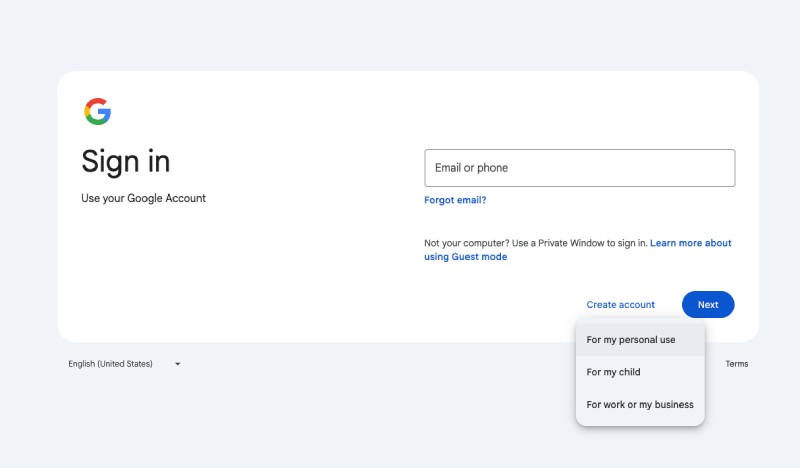
Step 1 Creating Google Account With Existing Email

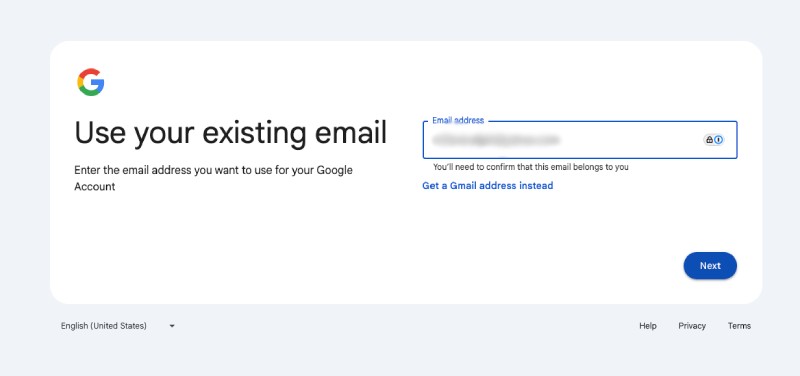
Step 3: Click “Use your existing email”

Instead of creating a new Gmail address, click the link that says “Use your existing email address.” This lets you sign up with a non-Google email like your work or personal domain.
Step 2 Creating Google Account Using Existing Email

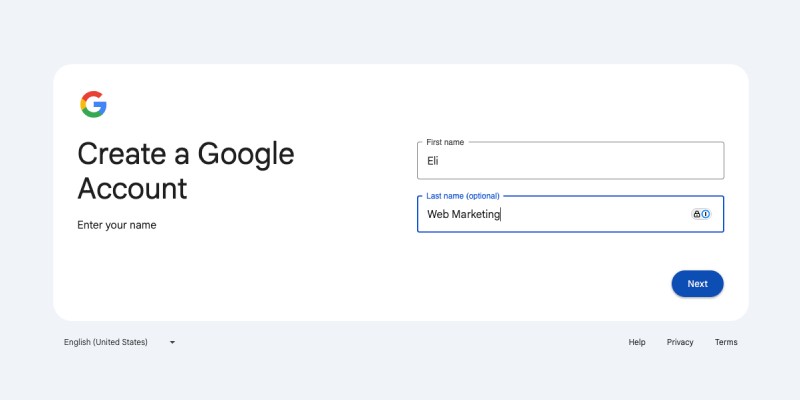
Step 4: Complete The Registration Form

Fill in your name, the email you want to associate with your Google account, a password, and your birthday and gender. Click Next.
Step 3 Creating Google Account Using Existing Email

Step 5: Verify Your Email

Google will send a confirmation code to the email address you provided. Open your inbox, grab the code, and enter it on the screen.
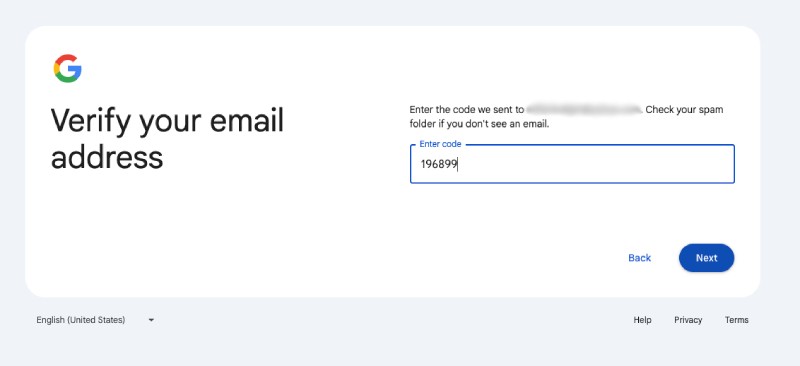
Step 4 Creating Google Account Using Existing Email

Step 6: Finish Setting Up Your Account

After verifying your email, Google may ask for additional information like a phone number or recovery email. You’ll then be asked to agree to Google’s terms and privacy policy.
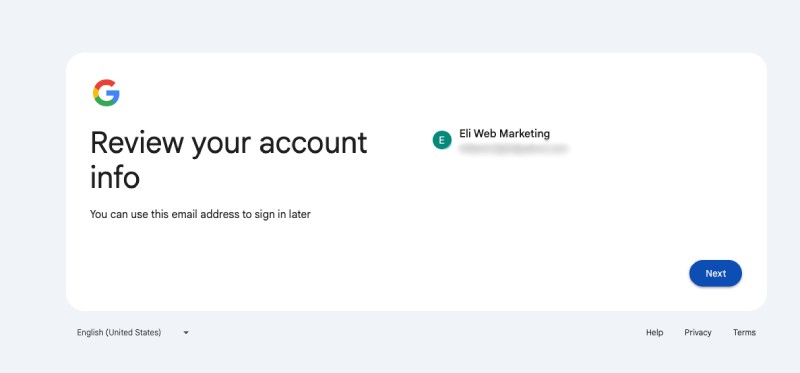
Step 5 Creating Google Account Using Existing Email

What To Do If Your Email Is Already Linked To Google

If you receive a message saying your email is already in use, try signing in at https://accounts.google.com and use the Forgot Password option. You likely created a Google Account with that email in the past.

You’re Done!

You now have full access to Google services (Calendar, Docs, YouTube, Analytics, and more) without needing a Gmail address.

Elijah Millard Headshot

Elijah Millard

Principal, Digital Marketing

Elijah leads the marketing department, organizing and implementing creative and innovative digital marketing campaigns with a background in mass communications & psychology.

321 Web Marketing logo circle new

About 321 Web Marketing

Inbound Lead Generation Company

We provide expert national SEO services to help businesses rank for lead-generating search terms on the front page of Google.

Share this post

Copy to clipboard

What Our Clients Are Saying About Us

MFE Insurance Logo

Alec Roberts

MFE Insurance

I can’t say it enough, Jonathan and his team have gone above and beyond since day one to accommodate our needs and meet our goals. I run a specialty insurance brokerage based in LA and once we found 321 we never looked [...]

Advantage Tech Logo

Richard Wilbur III

Advantage.Tech

Thanks to 321 Web Marketing’s web development work, the client increased rankings and traffic from search engines. Also, their business secured prominent positions on Google Maps and industry-relevant, profitable [...]
FVCBank logo

Bruce Gemmill

FVCbank

After the website revamp, the client saw a steady rise in leads from search engines, resulting in additional traffic. 321 Web Marketing is highly punctual when it comes to deliverables, and internal stakeholders are [...]

VAE Logo

Drew Weeks

VAE

321 Web Marketing delivered a sleek website that accurately portrays the size and quality of the client’s organization. All of their completed websites have received positive feedback from users who have been [...]

Business Benefits group logo

Kelly Cole

Business Benefits Group

My company hired 321 Web Marketing in February 2016 to resurrect our web site. We feel our web site is the face to our business and desperately needed a make over. 321 took us from blah to WOW effortlessly and what a difference [...]
Diener & Associates Logo

Emily Hawkins

Diener & Associates

Thanks to 321 Web Marketing, the client has seen an increase in their search engine leads, averaging 12 qualified leads per month. The client has also achieved prominent Google Maps and search placement. The team [...]
Paw Pals Pet Sitting Logo

Trevor Telesz

Paw Pals Pet Sitting

321 Web Marketing successfully translated the client’s design into a stunning and refreshed website, ensuring seamless functionality across all dynamic views. The team provided clear timelines and stuck to them, [...]

Spartan Animal & Pest Control Logo

Corey Davis

Spartan Animal & Pest Control

321 Web Marketing is truly phenomenal at what they do. Their ability to communicate and describe the steps and actions that they are implementing, Alex Zarpas in particular, is excellent. Delivering on promises is all [...]


Previous
Next

Related Articles

digital marketing for promotion of products with social media, email, website and channel search engine
About 321 Web MarketingNov 12, 2026 · 6 min read

What Should a New Marketing Hire Accomplish in Their First 90 Days

Read More

Most channels take 6 to 12 months to pay back, but the review lands at day 90. Here is what a new marketing hire should actually deliver by then.

AI search engine optimization concept featuring artificial intelligence interface, smart search mode
Jonathan GessertNov 2, 2026 · 6 min read

How Do AI Search Engines Use Brand Authority To Choose Sources

Read More

Ahrefs found branded mentions correlate 3x stronger than backlinks with AI Overview visibility. Here is how AI search engines actually pick sources.

How to Get Your Business Cited in AI Search Results
Jonathan GessertOct 29, 2026 · 7 min read

How Does Being Cited in an AI Overview Affect Click-Through Rates?

Read More

You got cited and the clicks barely moved. Find out what AI Overview click-through rate data shows, and start tracking the four numbers that matter.

Ready for leads you can trace to a source?

Book a free strategy session. We'll show you who's winning your market and why.

Free Consultation
321 Web Marketing

1900 Reston Metro Plaza
Suite 600
Reston, VA 20190

Contact Us
ServicesSEOAI Search OptimizationGoogle Ads ManagementContent MarketingWordPress SupportAnalytics & Dashboards
Who We ServeHome ServicesProfessional ServicesContractorsLaw FirmsInsurance AgenciesManaged IT & Cybersecurity
Our SoftwareLead TrackerContent PortalSEO/SEM Dashboard321 WordPress Theme321 WordPress PluginAI Website QA Tool
Who We AreAboutOur ProcessTeamCase StudiesPortfolioAwardsCommunityCareers
LearnBlogGuidesAgency NewsGoogle Algorithm UpdatesROAS CalculatorLead Gen BenchmarksWebsite Checklist
Clutch 1000 2025 Award5.0 on Clutch16 reviews
5.0 on Google5.0 on Google26 reviews
© 2026 321 Web MarketingPrivacy PolicyTerms of UseClient Login